> ## Documentation Index
> Fetch the complete documentation index at: https://cashfreepayments-d00050e9-theme-update.mintlify.site/llms.txt
> Use this file to discover all available pages before exploring further.
# Payment Link
To create a payment link you need first add your product and customer details. You can then share the payment link via SMS, email, Whatsapp or any other platform. You can also set auto reminders to receive the payment.
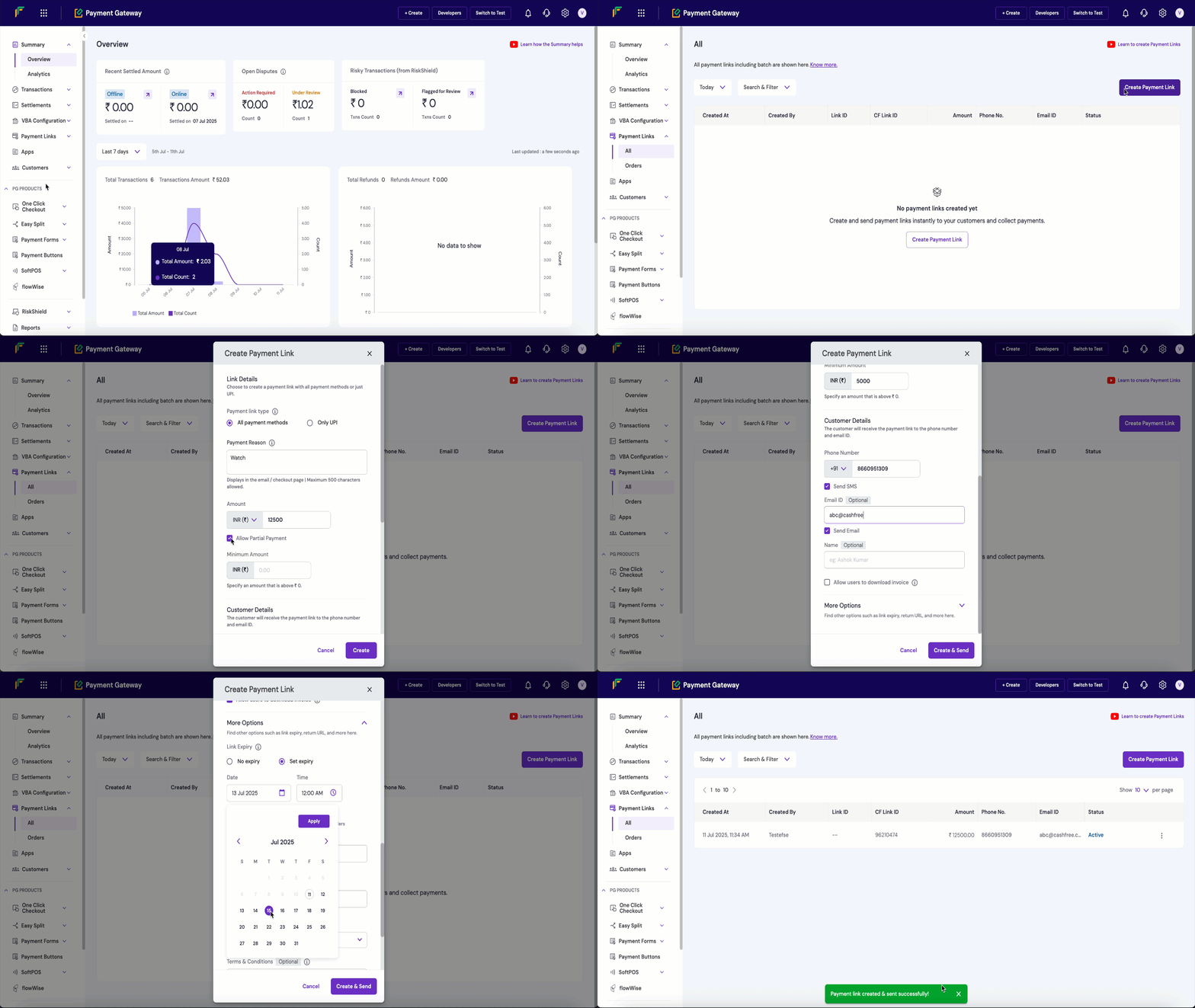
The image below shows how to create a payment link from the dashboard, the steps are mentioned below.
## UPI payment link
UPI payment links are unique URLs that let customers instantly pay using any UPI app (like Google Pay, PhonePe, or BHIM). When clicked, these links automatically open the customer's preferred UPI app with all payment details pre-filled.
To create a UPI payment link, navigate to Payment Gateway `Dashboard → Payment Links → Create Payment Link`, then select `Create UPI Link`.
## Payment link options
To send payment reminders automatically to your customers. Contact your Account Manager to activate auto reminders.
When you create Payment Links and if the option Send Auto Reminders is enabled, by default, reminders will be sent 1 day after creating the payment link, the subsequent day, and 1 day before the payment link expires. All reminders will be sent between 12 PM to 6 PM.
You can send any 3 payment reminders from the following available options:
* Based on payment link **creation date** - 1, 2, 3, 7, 14 days after creating the link
* Based on payment link **expiry date** - 1, 2, 3, 7, 14 days before the payment link expires
Example: A payment link is created on the 1st of September, and the expiry date is the 30th of September. You can send a maximum of three reminders to customers. You can select to send the reminders from the dates specified here - 1st, 2nd, 3rd, 7th, 14th day of creating the payment link/before the payment link expires.
You can either choose from the available messages or create a custom message.
## Create via batch upload
To use the batch feature, fill out the [Support Form](https://merchant.cashfree.com/merchants/landing?env=prod\&raise_issue=1) with your business requirements. We will verify the details and activate it for your account. While the feature is being activated, you can test the flow in the test environment.
Use the batch feature to create multiple payment links at once. Add all required details in a single file following the specified format, and upload it in the batch section. Download the sample file to check the required fields for the batch upload.
**Note**: Cashfree Payments doesn't send SMS and email notifications instantly for batch uploads. Instead, notifications are randomly scheduled between 5 to 50 minutes after the upload. This prevents potential issues in the notification service when merchants upload large batches, such as 50,000 entries at once.
## Create via API
You can create a payment link through [Create Payment Link API](/api-reference/payments/latest/payment-links/create).
## Track orders and payments
Each time a customer opens a payment link and attempts a payment, a new order is created for that link. This lets you track how many times the customer clicked the link before completing the full payment.
You can use this information to follow up with customers and improve your conversion rate.
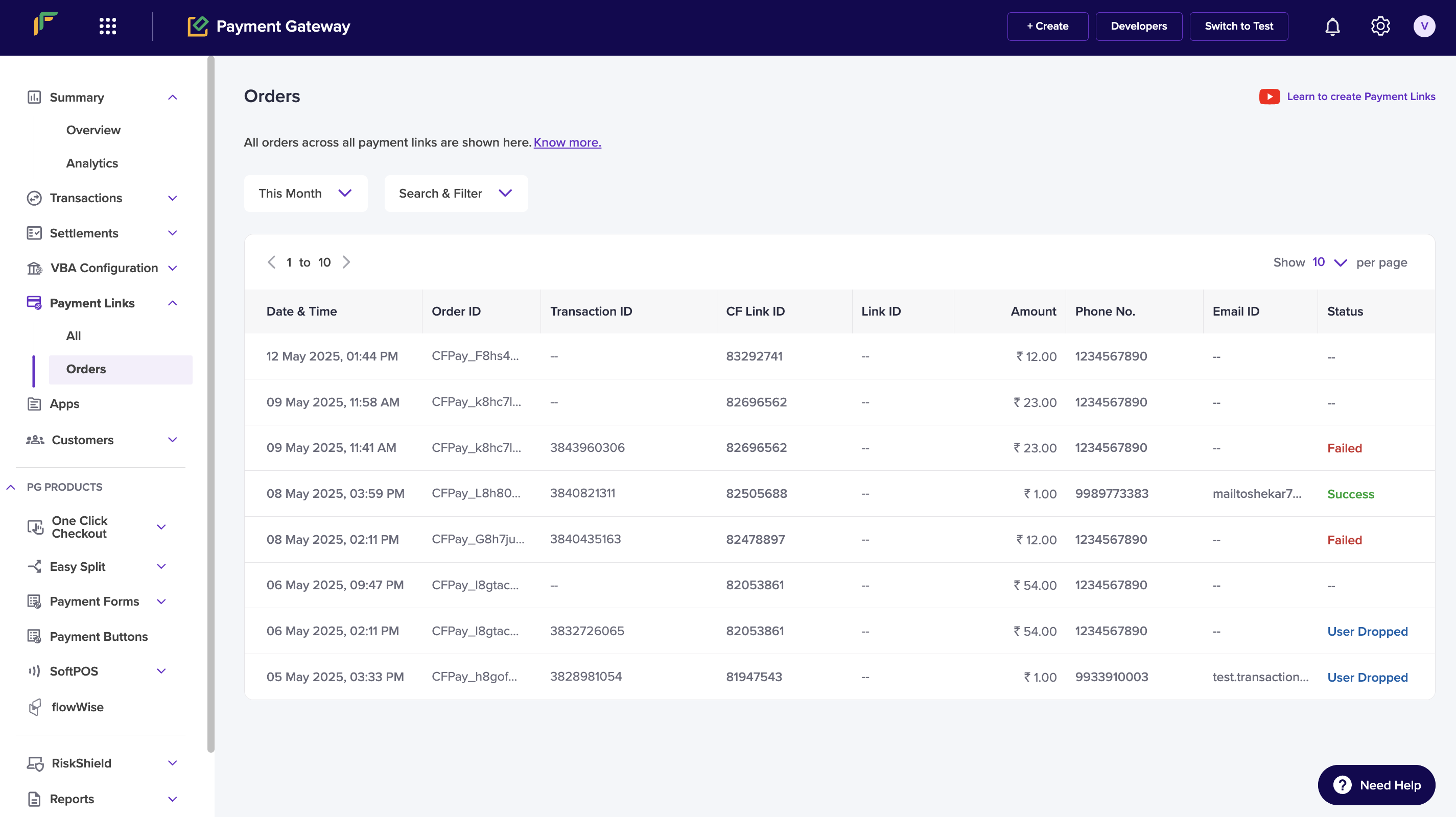
To view order details for a payment link, go to **Payment Gateway Dashboard** > **Payment Links** > **Orders**.
You can filter the list by date range. You can also filter by status: **Success**, **Pending**, **Failed**, **User Dropped**, or **Incomplete**.
## Payment link lifecycle
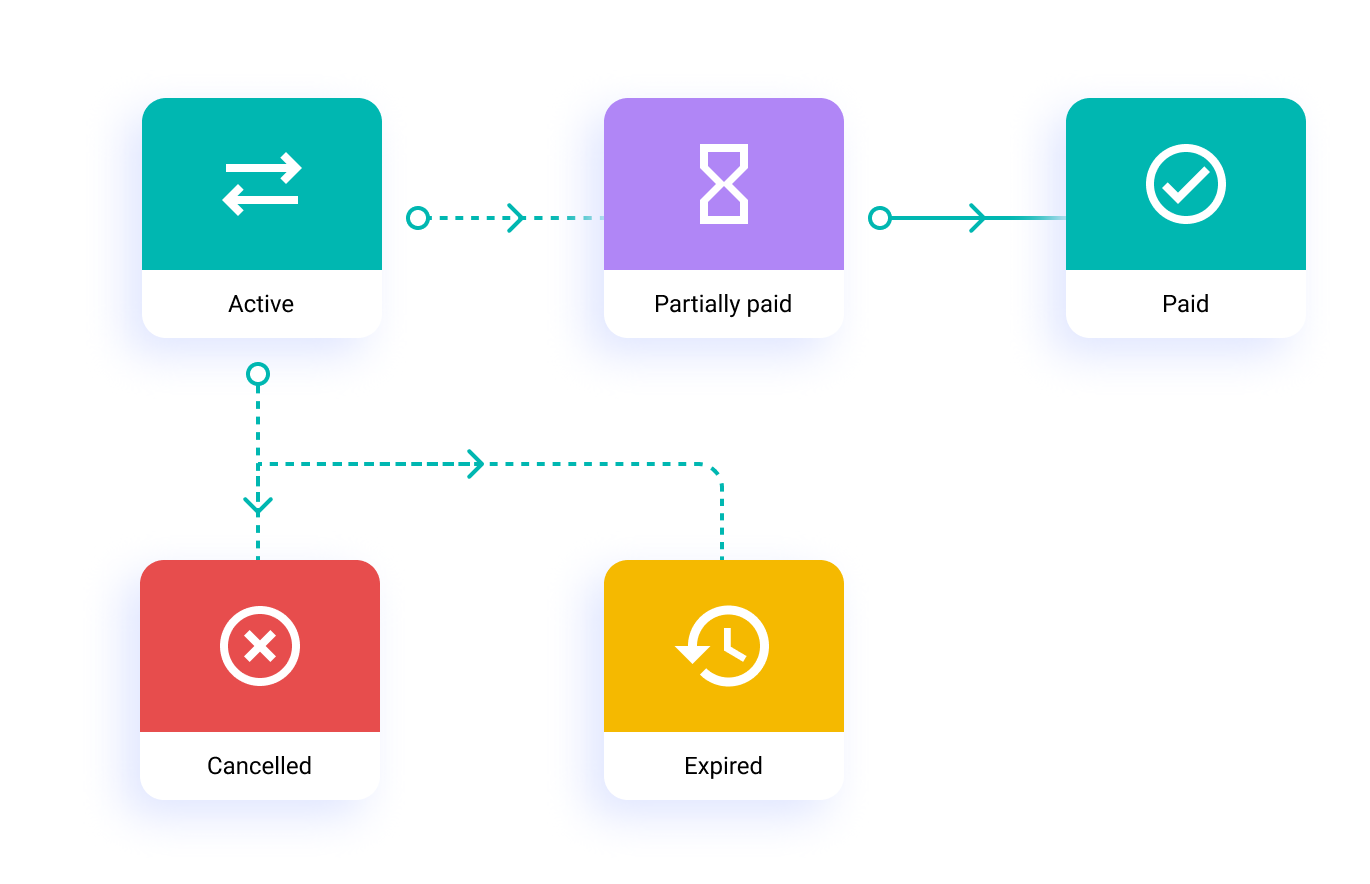
A payment link moves through different states from creation to completion. Here's what each status means:
| State | Description |
| ---------------- | --------------------------------------------------------------------------------------------------- |
| `ACTIVE` | Default state upon creation. Link is valid and ready to accept payments until cancelled or expired. |
| `PAID` | Payment completed in full. Link becomes inactive. |
| `PARTIALLY_PAID` | Partial payment received. Additional payments allowed. Customer reminders available. |
| `EXPIRED` | Link has exceeded its validity period. No longer accepts payments. |
| `CANCELLED` | Link manually cancelled by merchant. No longer accepts payments. |
The link starts as `ACTIVE` and transitions to other states based on payment activity or administrative actions.
## FAQs
posthog.capture('Accordion Clicked', { title: "How do I start using Payment Links with Cashfree?" })}>
Simply sign up for a Payment Links account, and Cashfree Payment Gateway will be automatically activated for your account. The Payment Links feature will be available inside the **Payment Gateway** product.\
All payments collected via the payment links are automatically updated in the **Reports** and **Transactions** module in Cashfree Payment Gateway.
Know more in the documentation [here](https://www.cashfree.com/docs/payments/no-code/payment-link).
{" "}
posthog.capture('Accordion Clicked', { title: " Can I create a payment link for a restricted time period?" })}>
Yes, you can create a payment link in the Cashfree Payment Gateway Dashboard with an expiry limit to ensure you get paid within a specific timeframe.
posthog.capture('Accordion Clicked', { title: "What information do I need to provide to create Payment Links?" })}>
Enter the customer’s phone or email, amount, and purpose, then share the link. You can also enable SMS & Email notifications, set an expiry date, and allow partial payments for added flexibility.
Click [here](https://www.cashfree.com/docs/payments/no-code/payment-link#payment-link) to know more
posthog.capture('Accordion Clicked', { title: "Can I create Payment Links in bulk?" })}>
Yes, you can create Payment Links in bulk using the Batch feature. Simply fill out the Support Form with your business requirements, and we’ll verify and activate it for your account. Meanwhile, you can test the flow in the sandbox.
Once activated, upload a file with the required details in the Batch section. Download the sample file to check the format.
posthog.capture('Accordion Clicked', { title: "Can my customers make multiple partial payments on Payment Links?" })}>
Yes, you can enable **Partial Payments** and provide the minimum amount you
wish to collect for a Payment Link. The customer can choose to make multiple
payments, between the minimum amount and the link amount. Cashfree will notify
you of all partial payments done.
posthog.capture('Accordion Clicked', { title: "Are international payments supported on Payment Link?" })}>
Yes, it is possible to enable international payments on Cashfree Payment
Links. Talk to us and help us understand your business for quick activation.
If you have a **Paypal** account, connect **Paypal** to Cashfree and start
offering Paypal as a checkout option on the payment page instantly.
posthog.capture('Accordion Clicked', { title: "What are Orders?" })}>
Each time your customer opens a payment Link and attempts payment, a new
Order is created against that link. This gives you the information on how
many times the customer has visited the link before completely paying the full
amount. You can follow up with such customers and try to improve your
conversion rate.
posthog.capture('Accordion Clicked', { title: "What are Cashfree Payment Links and why should I use them?" })}>
Payment Links by Cashfree is the easiest way to receive payments from your customers for any goods or services, without taking them to any app or website.
Payment Link can be shared with the customer via different channels like WhatsApp, SMS, email, etc., and upon clicking the link, your customers can pay using all available payment methods. Cashfree Payments will notify you when payment(s) are made using the link.
Payment Links are a **no-code solution** that are used to accept online payments without any payment gateway integration required. Any business can create a payment link and collect online payments. No website required.
posthog.capture('Accordion Clicked', { title: "How can I create payment links for my business?" })}>
1. Go to **Payment Gateway Dashboard** > **Payment links** > **Create Payment Link**
2. List the reason, the amount and the customer details.
3. You can also select an expiry time for the link, a custom thank you message, add a note in the more section.
4. Click create and all set!
posthog.capture('Accordion Clicked', { title: "How can I create UPI payment links for my business?" })}>
Create and share UPI payment links with your customers to accept payments via UPI applications. To create a UPI payment link, you first need to add your product and customer details. You can share the payment link via SMS, email, WhatsApp, or any other platform. To make payments, customers must click the URL that you have sent, and a list of UPI apps installed on their mobile will be displayed. Customers can select any UPI app and complete the payment. A maximum amount of rupees 1 Lakh can be collected using the UPI payment link.
To create a UPI payment link:
1. Go to **Payment Gateway Dashboard** > **Payment Links** > click **Create Payment Link**.
2. Select the option **Create UPI Link**.
3. In the **Payment For** field, explain what the customer is making the payment for. Keep this text short and clear. This information is important for customers to understand the purpose of payment. Partial payments are not allowed for the UPI payment method.
4. Set the **Link Expiry** limit.
5. Enter the customer details (phone number and email ID) to send the payment link.
6. Select the option **Send Auto Reminders** to send payment reminders automatically to your customers.
7. Enable **Send Auto Reminders** option to notify your customers about the payment. Click [here](/payments/no-code/payment-link) to know more.
8. You can add the **Link ID** and additional description for your reference. This will not be visible to your customers.
posthog.capture('Accordion Clicked', { title: "What information is required to create a Payment Link?" })}>
To quickly request payment from your customer via Payment Link, you simply need to provide the customer’s phone or email information, and the amount and purpose for the link. Once the details are entered, the link can be shared with the customer.
While creating a Payment Link, you can:
* Enable the **Send SMS** and **Email** checkboxes, and Cashfree will send the link to the customer on the provided contact information.
* Set the **expiry** for the link.
* Enable **partial payments** if you want the customer to make payments in parts.
posthog.capture('Accordion Clicked', { title: "Can I generate a report of all payment link transactions?" })}>
Yes, you can generate a report of all payment link transactions.\
The payment link orders report provides the list and details of orders and payments made against all payment links within the selected period. This includes order details, customer details, transaction amount, payment method, transaction status, settlement UTR (if the settlement is complete), and more.
To generate the payment link orders report:
1. Go to **Payment Gateway Dashboard** > **Reports**.
2. In the **Report Type** field, select **Payment Link Transactions**, and click **Generate**.
3. Select the date range for which you want to view the report, and click **Generate**.
The report will be generated based on your selected criteria. You can download the report after it has been generated.
posthog.capture('Accordion Clicked', { title: "Do I get notified when a payment is made on a payment link?" })}>
Yes, you can use webhooks to get notified about different events such as orders, payments, and settlements.
The **Payment Link webhook** will be triggered when your customer makes a complete or partial payment using the payment link you shared. You will also be notified via the same webhook when the payment link gets cancelled or expired.
posthog.capture('Accordion Clicked', { title: "Can I create a payment link for a restricted time period?" })}>
Yes, you can create a payment link in the Cashfree payment gateway dashboard, with an expiry limit to make sure you get paid within a specific timeframe.
posthog.capture('Accordion Clicked', { title: "How to share a Payment Link?" })}>
The payment link can be shared via SMS, email, Whatsapp or any other platform.
 ## UPI payment link
UPI payment links are unique URLs that let customers instantly pay using any UPI app (like Google Pay, PhonePe, or BHIM). When clicked, these links automatically open the customer's preferred UPI app with all payment details pre-filled.
To create a UPI payment link, navigate to Payment Gateway `Dashboard → Payment Links → Create Payment Link`, then select `Create UPI Link`.
## Payment link options
## UPI payment link
UPI payment links are unique URLs that let customers instantly pay using any UPI app (like Google Pay, PhonePe, or BHIM). When clicked, these links automatically open the customer's preferred UPI app with all payment details pre-filled.
To create a UPI payment link, navigate to Payment Gateway `Dashboard → Payment Links → Create Payment Link`, then select `Create UPI Link`.
## Payment link options
 ## Payment link lifecycle
A payment link moves through different states from creation to completion. Here's what each status means:
| State | Description |
| ---------------- | --------------------------------------------------------------------------------------------------- |
| `ACTIVE` | Default state upon creation. Link is valid and ready to accept payments until cancelled or expired. |
| `PAID` | Payment completed in full. Link becomes inactive. |
| `PARTIALLY_PAID` | Partial payment received. Additional payments allowed. Customer reminders available. |
| `EXPIRED` | Link has exceeded its validity period. No longer accepts payments. |
| `CANCELLED` | Link manually cancelled by merchant. No longer accepts payments. |
The link starts as `ACTIVE` and transitions to other states based on payment activity or administrative actions.
## Payment link lifecycle
A payment link moves through different states from creation to completion. Here's what each status means:
| State | Description |
| ---------------- | --------------------------------------------------------------------------------------------------- |
| `ACTIVE` | Default state upon creation. Link is valid and ready to accept payments until cancelled or expired. |
| `PAID` | Payment completed in full. Link becomes inactive. |
| `PARTIALLY_PAID` | Partial payment received. Additional payments allowed. Customer reminders available. |
| `EXPIRED` | Link has exceeded its validity period. No longer accepts payments. |
| `CANCELLED` | Link manually cancelled by merchant. No longer accepts payments. |
The link starts as `ACTIVE` and transitions to other states based on payment activity or administrative actions.