> ## Documentation Index
> Fetch the complete documentation index at: https://cashfreepayments-d00050e9-theme-update.mintlify.site/llms.txt
> Use this file to discover all available pages before exploring further.
# Verify Bank Accounts
Cashfree Payments allows you to verify Indian bank account details to process payments. There are certain sectors such as securities, mutual funds, and others that mandates the verification of bank account information to process online payments. Using this feature ensures that you process the transfers to the right beneficiary accounts. It minimises failed or transfer reversals from the bank.
You can verify beneficiary bank account details using the dashboard or integrate using the [bank account verification API](/api-reference/vrs/v2/bav-v2/bank-account-verification-sync-v2). To verify the customer's bank details, you need their bank account number and IFSC. You can verify the bank accounts individually or in batches at a time.
When you have a large number of accounts to be verified, simply upload all the details in a file as per the format suggested and upload it to verify the details, or use the [bulk bank verification API](/api-reference/vrs/v2/bav-v2/bulk-bank-account-verification-v2) to do the same.
To help you save time in verifying if a particular account belongs to the right person, a new feature has been introduced. It will provide the percentage of name match, result, and reason. These details will help you with faster validation and less effort. Contact your account manager or Fill out the [Support Form](https://merchant.cashfree.com/merchants/landing?env=prod\&raise_issue=1) to activate this feature for your account. Click [here](/secure-id/kyc-stack/verify-bank-account#name-match-score) to know more.
## Verify Bank Account Details for Free
You can verify your beneficiary bank account details at no charge using the free credits. With this limited-time offer, experience and test the feature without paying any verification charges.
1. From the **Verification Suite** dashboard, click **Verification Suite - Bank Account**.
2. A banner displays the offer for you on the **Verification Suite - Bank Account** page.
3. Click **Claim Free Credits** and instantly redeem the credits to your account.
## Verify domestic bank accounts
Follow the instructions below to verify domestic bank accounts:
1. Log in to the \_ Verification Suite\_ dashboard using your credentials.
2. From the *Home* screen, navigate to **Bank Account/UPI 360** > **Bank Account Verification** > **Verify Bank Account**.
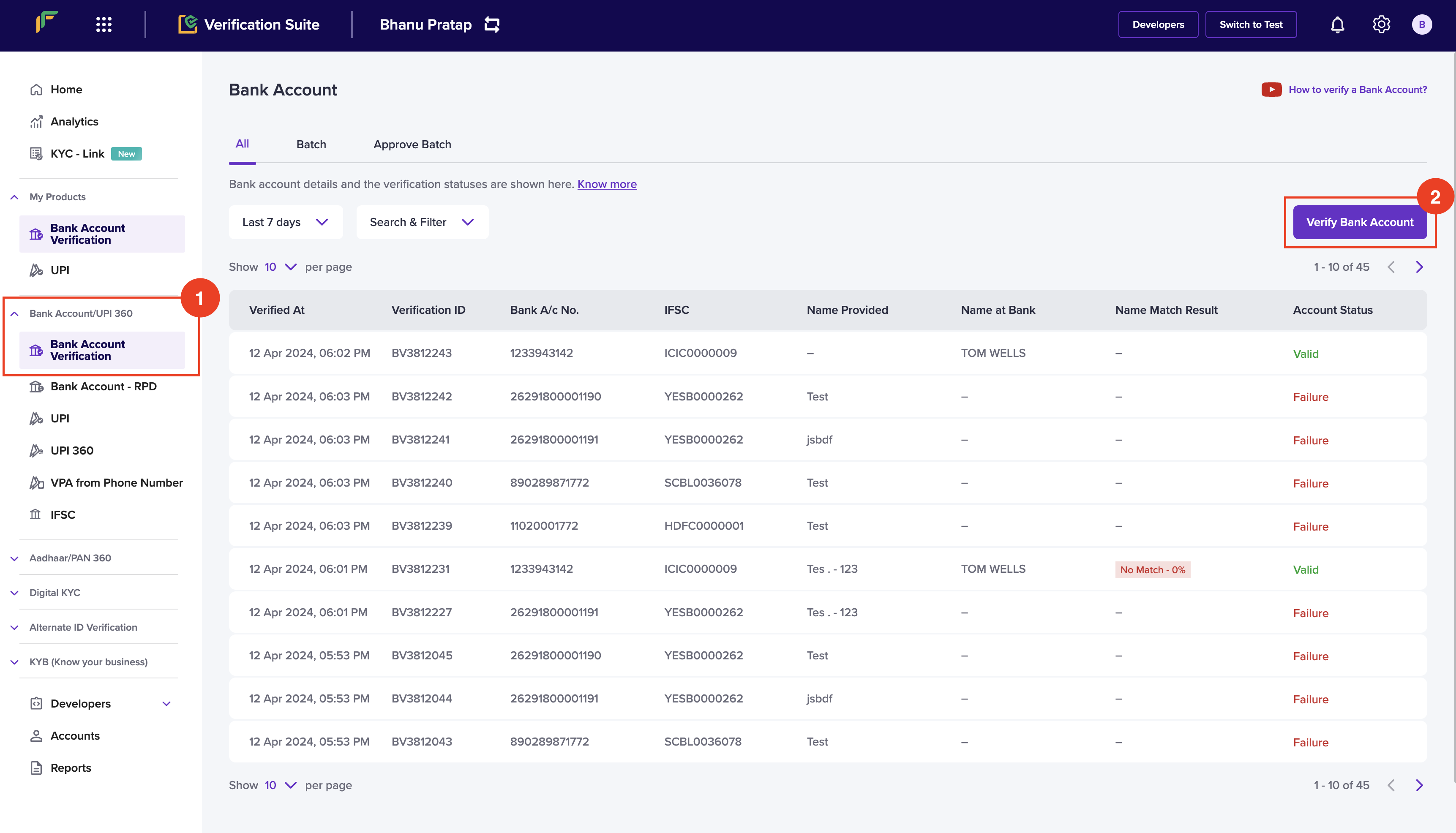
3. In the *Verify Bank Account* popup, enter the following information:
* **Account Number** - Enter the account number of the individual.
* **IFSC** - Enter the IFSC information.
* **Account Holder Name** - Enter the name of the bank account holder.
* **Phone Number** - Enter the phone number of the individual.
4. Click **Verify**.
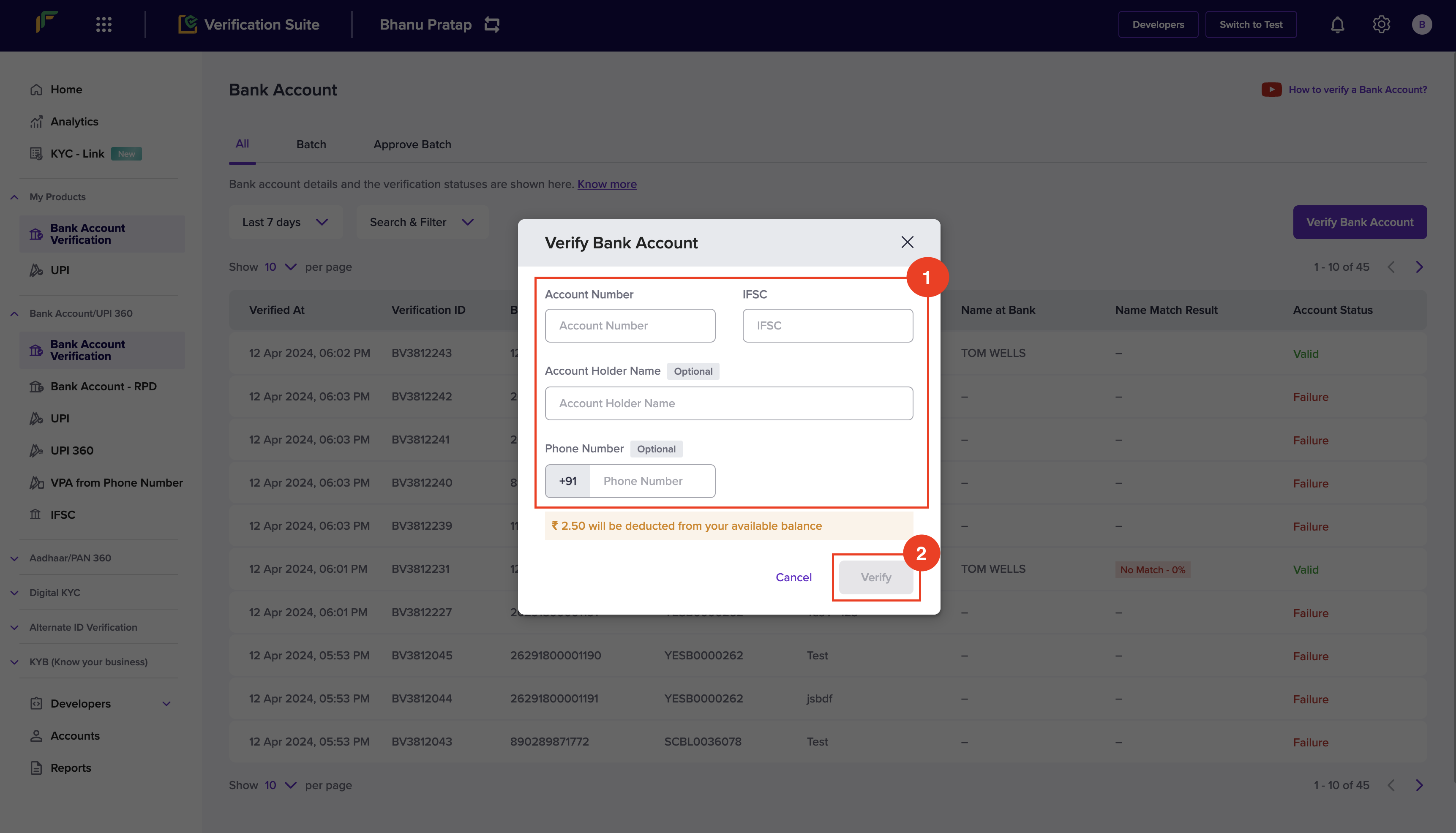
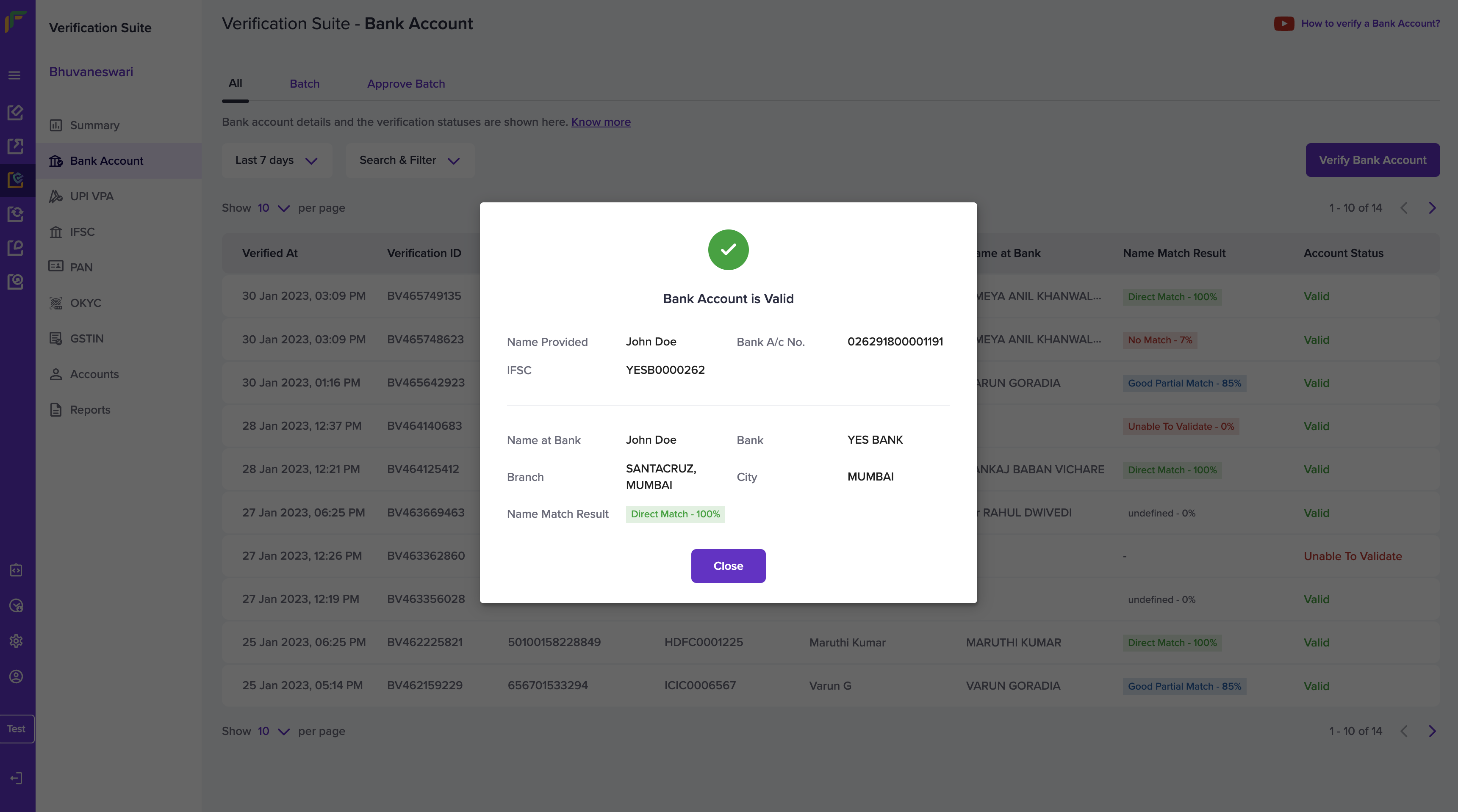
5. The bank account information is verified. You will receive a popup that displays if the information is valid or not.
Because of the IMPS constraints, only the first 4 characters of IFSC are
validated.
## Verify Bank Accounts in Batch
When you have a large number of bank accounts to be verified, you can upload a single file with all the details to verify the accounts in one go, or use the [bulk bank account verification API](/api-reference/vrs/v2/bav-v2/bulk-bank-account-verification-v2).
To verify all the bank accounts, you must upload a **.csv, .xls, or a .xlsx** file that contains the account number, IFSC, account holder name and phone number of the accounts you want to verify. Download the sample file to know how the details must be filled in the file.
Follow the instructions below to upload a batch file:
1. Log in to the *Verification Suite* dashboard using your credentials.
2. From the *Home* screen, navigate to **Bank Account/UPI 360** > **Bank Account Verification**.
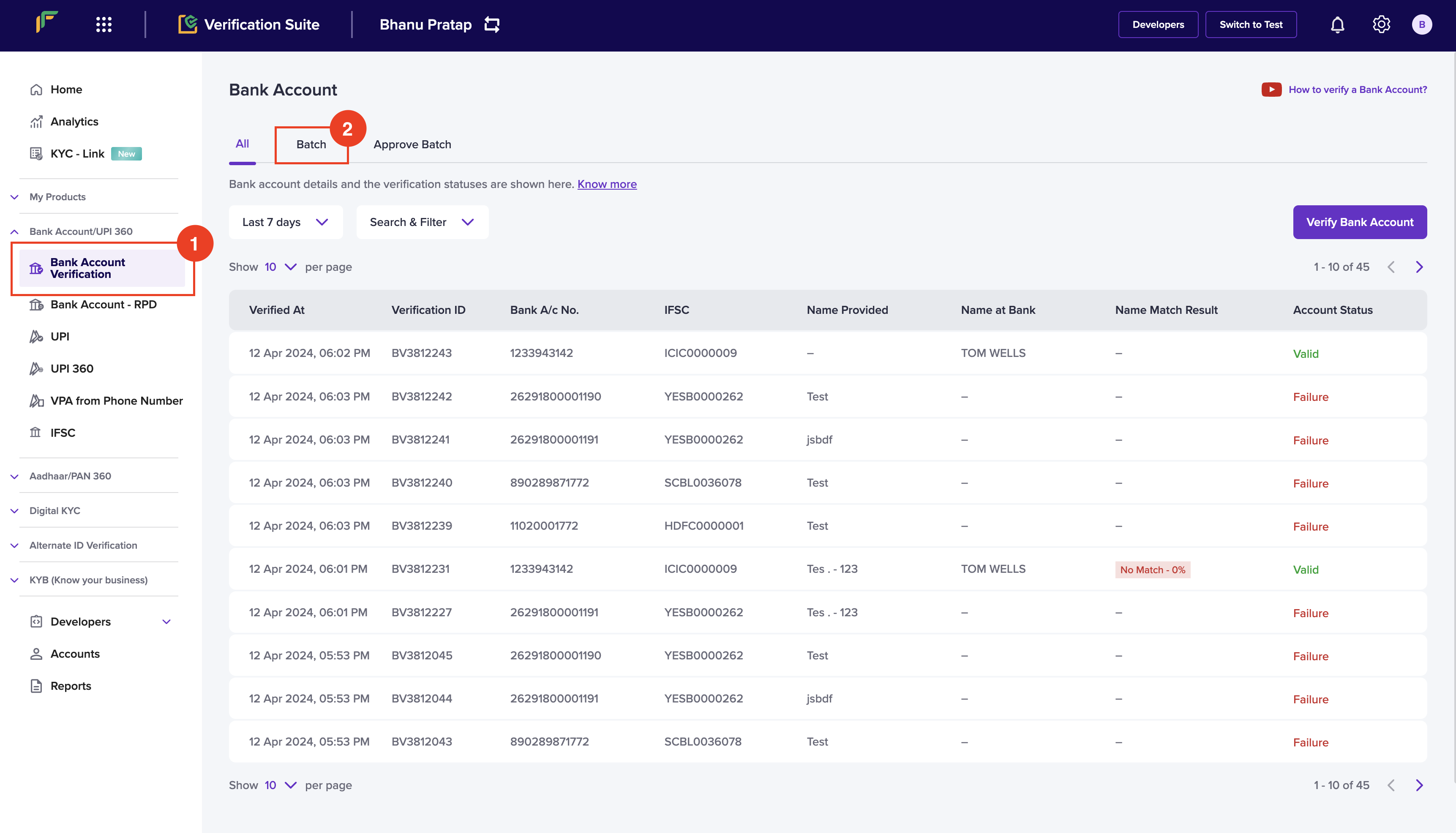
3. Click the **Batch** tab from the *Bank Account* screen, and click **Upload File**.
4. In the *Upload Batch File*, click **Download sample file** to download the format, and enter the bank account information as per the template in the file.
5. Click **Choose a file** to upload the file with the details.
6. Click **Upload**.
7. You can view the uploaded file in the form a table in the *Batch* tab.
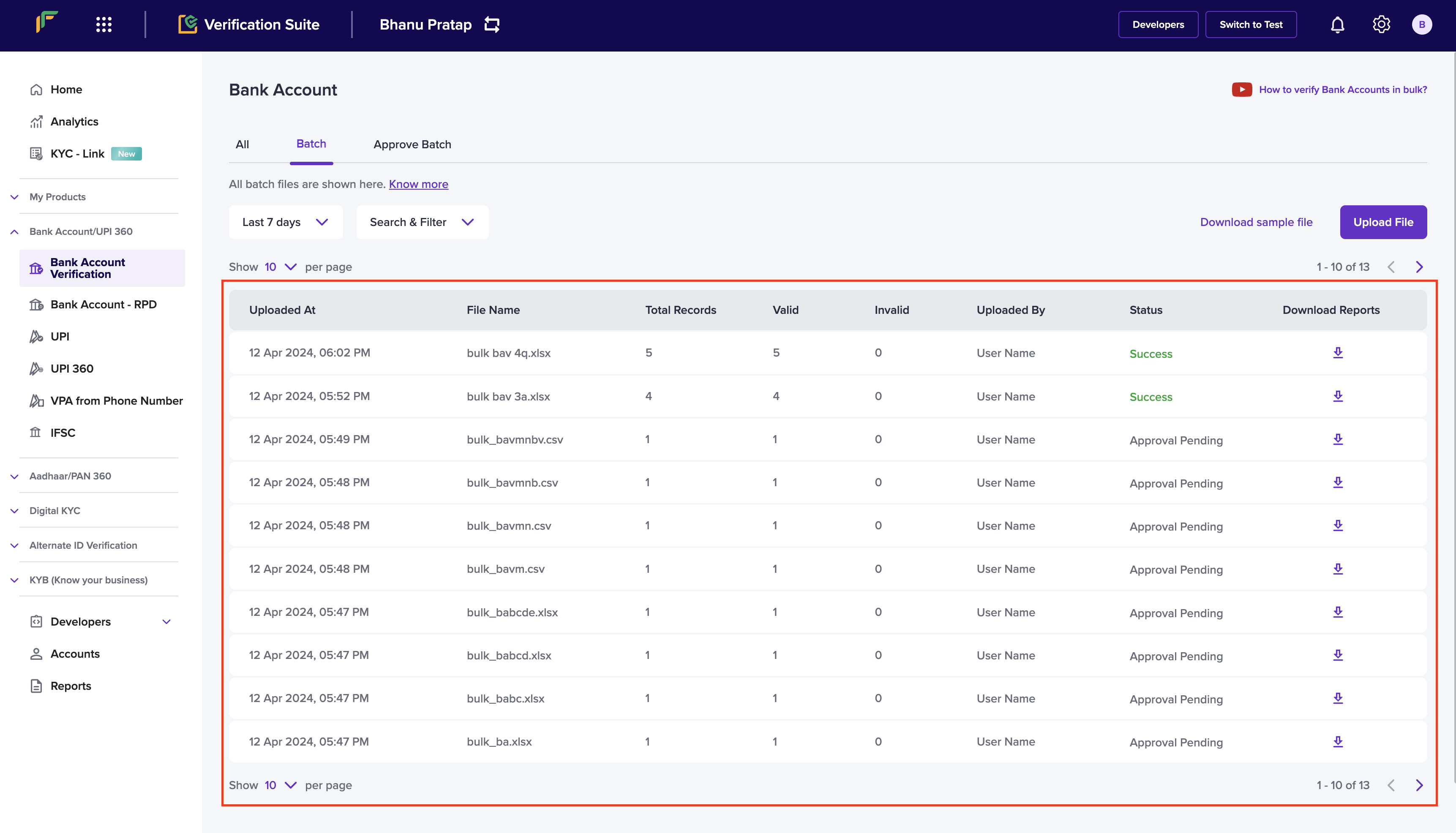
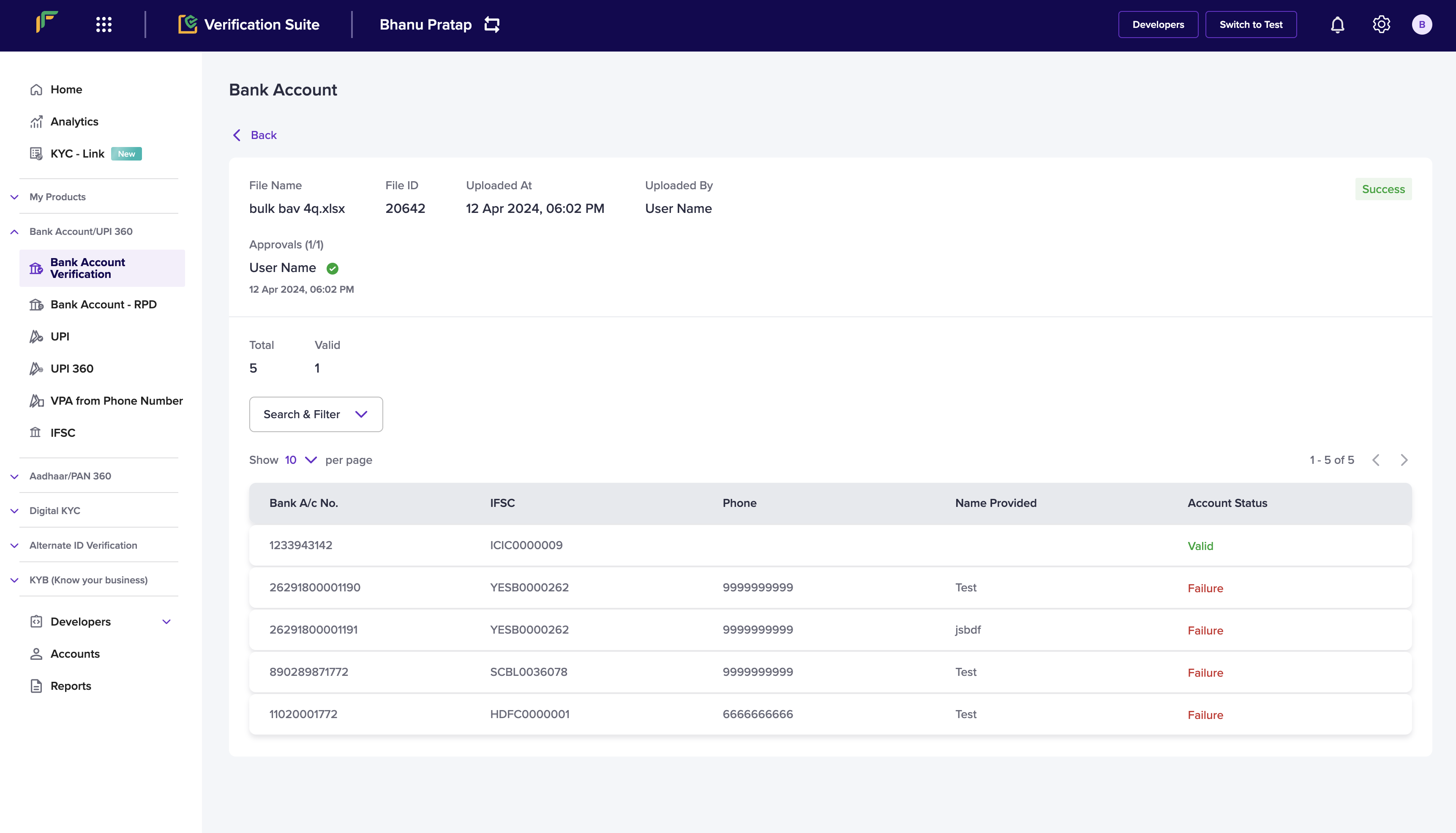
8. Click the uploaded file to view the following details:
* **File Name** - It displays the name of the uploaded file.
* **File ID** - It displays the unique identifier of the uploaded file.
* **Uploaded At** - It displays when the file was uploaded.
* **Uploaded By** - It displays who uploaded the file.
* **Approvals** - It displays the approver of the file uploaded.
* **Total** - It displays the number of bank account information added in the file.
* **Valid** - It displays the number of valid bank account information.
9. You can view the following details in the table:
* **Bank A/c No.** - It displays the bank account number.
* **IFSC** - It displays the IFSC information.
* **Phone** - It displays the phone number of the bank account holder.
* **Name Provided** - It displays the name of the bank account holder.
* **Account Status** - It displays the status of the bank account.
### Approve Batch Verification Flow
To verify a large number of bank accounts in one go Batch Upload of bank account details is supported. Since it involves verifying all the bank account details added in the file in one go, you may want to check and approve the file before the file is verified. To do this, you have to create an approver profile within Cashfree Account and after it gets approved by an approver, bank account details will be verified, and the status of individual accounts will be displayed in the file.
All the files that are pending approval will be shown in the **Approve Batch** section.
Cashfree Payments supports a maker-checker flow to check and approve the batch
files before they are verified. You can have a maximum of 3 approvers for your
file. Users in your company who have the required permission can view and
approve/reject the file. The approved files will be verified and the status of
the individual bank accounts will be displayed accordingly.
## Name Match Score
To manually check if the provided customer name and the name registered at the bank are the same, consumes a lot of time and effort. Cashfree Payments has introduced a new feature that will help you to verify if the names are the same and provide the result accordingly.
Two new parameters, **nameMatchResult** and **nameMatchScore** will be available in the response, which will help you make faster validations and process payments successfully.
**This is a recommended feature to ensure that payments are processed to the correct payee account.** Contact your Account Manager or Fill out the [Support Form](https://merchant.cashfree.com/merchants/landing?env=prod\&raise_issue=1) to activate the name match score feature for your account.
**Examples**:
**Direct Match**
| Name 1 | Name 2 | nameMatchResult | nameMatchScore |
| :------------------ | :------------------ | :-------------- | :------------- |
| Rohan Mathew Thomas | Rohan Mathew Thomas | Direct match | 100.00 |
These names are exactly the same, so we get a perfect score.
***
**Good Partial Match**
| Name 1 | Name 2 | nameMatchResult | nameMatchScore |
| :------------------ | :----------- | :----------------- | :------------- |
| Rohan Mathew Thomas | Rohan Thomas | Good partial match | 85.00 |
The name Mathew is missing in the above example, but the rest of the names match perfectly. So we are mostly sure it is the same person.
***
**Moderate Partial Match**
| Name 1 | Name 2 | nameMatchResult | nameMatchScore |
| :------------------ | :------------ | :--------------------- | :------------- |
| Rohan Mathew Thomas | Roshan Thomas | Moderate partial match | 61.00 |
In the above example, name **Thomas** matches both names and **han** matches both names, which increases the score, but overall a moderate partial match.
***
**Poor Partial Match**
| Name 1 | Name 2 | nameMatchResult | nameMatchScore |
| :------------------ | :------------- | :----------------- | :------------- |
| Rohan Mathew Thomas | Rohan Mathew K | Poor partial match | 55.00 |
In the above example, although the two names are the same, the initial K is completely different which means that it could be a different person. The namematchscore is low.
***
**No Match**
| Name 1 | Name 2 | nameMatchResult | nameMatchScore |
| :------------------ | :----- | :-------------- | :------------- |
| Rohan Mathew Thomas | Rajeev | No match | 14.00 |
***
**Score Categorization**
| Match Result | Match Score Range |
| :--------------------- | :---------------- |
| Direct Match | 100.00 |
| Good Partial Match | 85.00 - 99.00 |
| Moderate Partial Match | 60.00 - 84.00 |
| Poor Partial Match | 34.00 - 59.00 |
| No Match | 0 - 33.00 |
With Bank Account Verification API, you can automate the verification of bank account details, IFSC code, and match the user's name with the bank account holder's name at the bank.
## FAQs
posthog.capture('Accordion Clicked', { title: "I want to use Cashfree Payments marketplace settlement for paying vendors. Do I need to take verification feature separately?" })}>
Yes, if you are using Cashfree Payments marketplace settlement and want to use verification API as well, you need to opt for the feature separately. Our payment experts will help you with integration and you will be able to use the Cashfree Payments marketplace settlement and Verification Suite together.
posthog.capture('Accordion Clicked', { title: "How can I use Bank Account Verification API for KYC?" })}>
KYC or “Know Your Customer” is a process to be undertaken by businesses especially financial institutions to obtain information about the identity and address of the customers. One of the key documents is bank account details as the same is regarded as valid proof of the identity of a person/entity.
While onboarding vendors, delivery partners, or even employees, an organisation needs to do a bank account verification. Using Cashfree Payments API, this process can be automated by integrating with the company's existing internal system so that the bank verification process happens smoothly, without exposing the data to any third party. You can also verify PAN, Aadhaar and GSTIN of users or businesses with our Verification Suite.
posthog.capture('Accordion Clicked', { title: "For how many banks, can I do the verification?" })}>
The verification can be done for all the a/c of recognized Indian banks including all public banks, private banks, and 126+ co-operative banks\*. Note: Verification may not be possible for some cooperative bank a/cs.
posthog.capture('Accordion Clicked', { title: "How to verify a/c number on Cashfree Payments for multiple individuals?" })}>
On Cashfree Payments, you can do verification for any number of Indian bank accounts via two modes:
1. Manual entry on Cashfree Payments Bank Account Verification dashboard:
Here you will be required to enter only two details: Indian bank account number and IFSC. If you want to do bulk verification, You can access the bulk upload feature on the dashboard where you can upload a CSV/XSLX file with required details and get a quick response.
2. Using Bank Account Verification API:
This is an integrated automated way to do single/bulk verification. The API can be integrated with the existing company internal system or ERP and then the request can be pushed directly using APIs.
posthog.capture('Accordion Clicked', { title: "Why is Bank Account Verification important?" })}>
Our Plug and Play integrated a/c number Verification API helps you confirm bank account validity instantly. By accessing updated data, the risk of identity fraud and incorrect/incomplete data is reduced. The result such as the account holder’s name shown to you will be exactly as it appears in bank records.
posthog.capture('Accordion Clicked', { title: "I am planning to opt for Cashfree Payouts for bulk disbursals. Do I need to go for verification API separately?" })}>
Yes, Payouts is different. Users can integrate Bank Account Verification to do the validation & will be charged separately.
posthog.capture('Accordion Clicked', { title: "What are the other use cases of this(BAV) feature?" })}>
The capability to verify a/c can be used in multiple business scenarios such as:
1. A crucial part of the verification process before providing loans of all kinds (education, health, business, car etc)
2. Employee background check: A recruitment agency can use the feature for a candidate's background check
3. Vendor onboarding: A marketplace splitting commission with different vendors can use the feature to verify the a/c details at the time of onboarding the vendor, this also helps in correct payments later on.
The ability to integrate the API with existing ERP helps in reducing operational effort and saves cost by 90%.
posthog.capture('Accordion Clicked', { title: "Is there any limit on the total number of Bank Account Verification requests per day?" })}>
No, there is no such limit. You can use this feature to verify any number of bank accounts in a day 24\*7.
posthog.capture('Accordion Clicked', { title: "How much time does verification take?" })}>
On Cashfree Payments, you can verify a/c numbers instantly. As you submit the request, our API gives an instant response.
posthog.capture('Accordion Clicked', { title: "Is there any limit on the total number of UPI requests per day?" })}>
No, there is no such limit. You can use the feature to verify any number of UPI IDs in a day 24\*7.
posthog.capture('Accordion Clicked', { title: "I am planning to opt for Cashfree Payouts for bulk disbursals on UPI ID. Do I need to go for Verification API separately?" })}>
If you are a Payouts merchant, the Verification Suite products such as Bank Account Verification (including UPI), Aadhaar Verification, GSTIN Verification, and PAN Verification will be automatically enabled for you. However, you will be charged separately for each validation.
posthog.capture('Accordion Clicked', { title: "How to verify UPI ID on Cashfree Payments for multiple individuals?" })}>
On Cashfree Payments, you can do verification for any number of UPI IDs of individuals or entities via two modes:
1. Manual entry on Cashfree Payments UPI ID verification dashboard.
Here you will be required to enter only one detail: UPI ID (eg abc\@okaxis)
2. Using API
An integrated automated way to do UPI Verification. The API can be integrated with the company's existing internal system or ERP and the request can be pushed directly using APIs.
posthog.capture('Accordion Clicked', { title: "What is UPI ID Verification?" })}>
UPI ID (also called Virtual Payment Address or VPA) is a unique ID you need to create to send and accept money via UPI. Once a UPI address is created and mapped against your existing bank account, you can simply share your UPI address (eg. abc\@okaxis) with the payer.
As a business, verifying a UPI ID comes in handy. The different use cases can be
* Background verification at the time of onboarding a new user/vendor
* Before releasing payment to a UPI ID
With Cashfree Payments instantly verify if the UPI ID is valid, For a Valid UPI ID cross-verify the name of the account holder
posthog.capture('Accordion Clicked', { title: "How much time does the Verification take?" })}>
On Cashfree Payments, you can verify any number of UPI IDs instantly. As you submit the request, our API gives an instant response.