> ## Documentation Index
> Fetch the complete documentation index at: https://cashfreepayments-d00050e9-theme-update.mintlify.site/llms.txt
> Use this file to discover all available pages before exploring further.
# Overview
Cashfree’s Smart OCR (Optical Character Recognition) simplifies document verification by using proprietary computer-vision and AI models to extract and validate data from government ID images or PDFs. It returns structured JSON with key document fields and includes built-in quality, forgery, and rule checks. Smart OCR combines OCR, fraud detection, and data extraction in a single API, enabling merchants to automate KYC, onboarding, and fraud prevention with less effort.
Smart OCR supports the following document types:
* Cancelled cheque
* Aadhaar card
* PAN card
* Invoice
* Driving license
* Vehicle RC
* Passport
* Voter ID
## Use cases
The following are key use cases for the Smart OCR:
* **KYC verification**: Instantly extract and verify customer details from official documents for onboarding or compliance.
* **Loan applications**: Validate income and identity documents in real\*time during loan processing.
* **eCommerce and fintech platforms**: Speed up seller or partner registration by auto filling details from uploaded documents.
* **Gig economy platforms**: Automate the document submission and verification flow for contractors or service partners.
* **Travel and hospitality**: Document Verification of Passport, VISA OCR for travel bookings.
* **Gaming**: Age Verification using PAN, Aadhaar OCR for legal compliance and Regulatory Adherence to meet gaming industry KYC requirements.
## Why choose Cashfree?
Cashfree’s Smart OCR is a single solution that simplifies document verification, improves accuracy, reduces costs, and helps you go live faster.
* **Single integration**: Integrate once to handle different document types without managing multiple APIs. Smart OCR detects blurry or glary images, flags partial or obscured IDs, and prompts users to retake poor-quality images with clear feedback. This reduces rejections and lowers drop-offs.
* **Faster time to market**: Launch your verification process faster with less development and testing effort.
* **Cost efficiency**: Reduce maintenance costs with a single, streamlined API instead of managing multiple integrations.
* **Reliable accuracy**: Smart OCR uses industry-grade optical character recognition for high accuracy in text extraction and validation. It achieves over 97% accuracy across supported documents, extracts structured data, and works for all document types through one API.
* **Advanced fraud and quality checks**: Smart OCR automatically checks document quality and authenticity to prevent fraud and ensure reliable extraction. It detects blur, glare, partial images, black-and-white scans, and missing facial or QR information. It also flags screenshots and photos of screens to block tampered or fake documents.
**Upcoming Enhancement**:
* **Document Auto Classification**: Automatically identifies and categorises the document type eliminating the need to manually specify document types.
## Verifying documents with Smart OCR
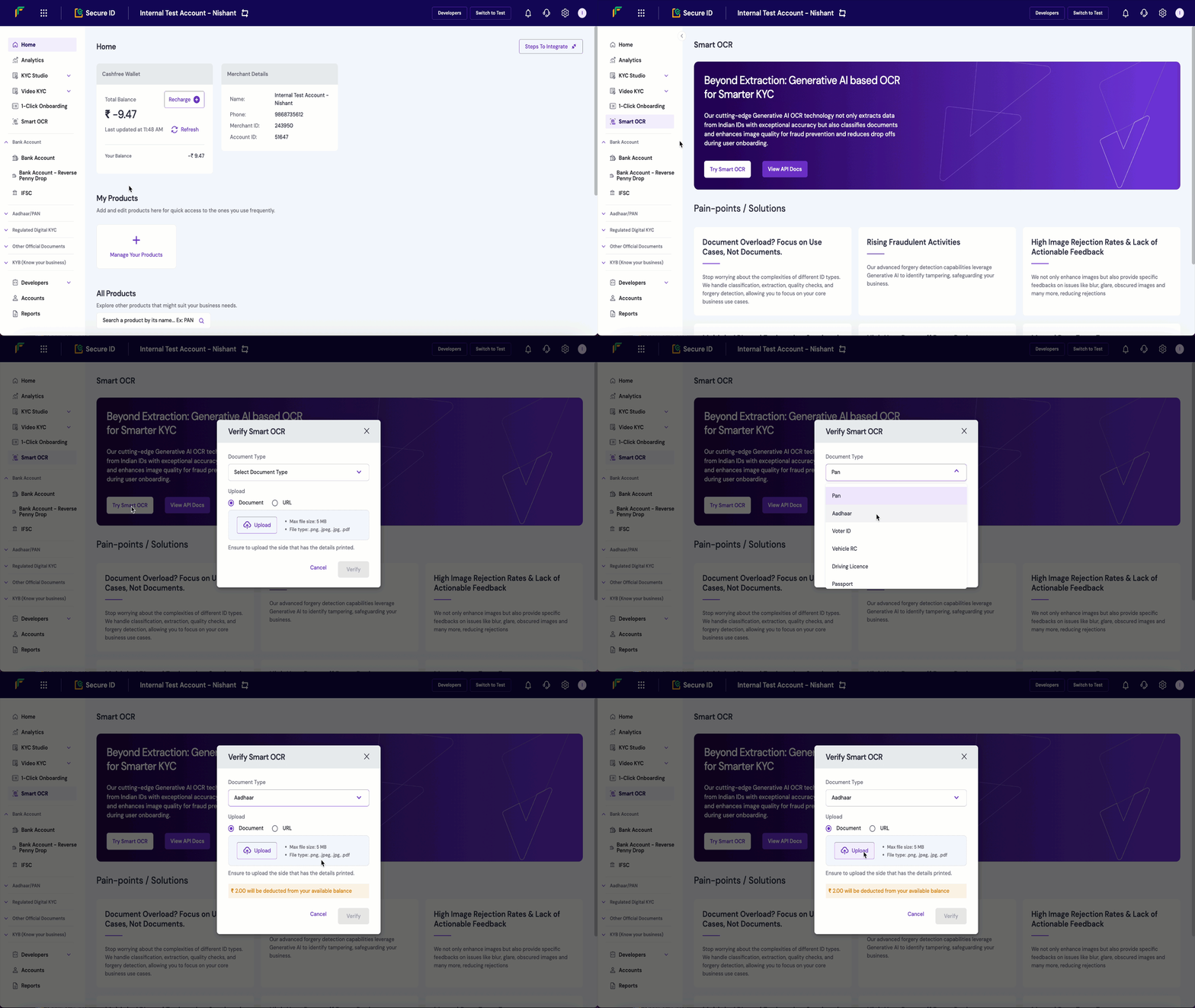
Follow these steps to verify documents with Smart OCR in the Merchant Dashboard:
1. Log in to the [Merchant Dashboard](https://merchant.cashfree.com/auth/login) using your registered credentials.
2. In the left navigation panel, go to **KYC Studio** and select **Smart OCR**.
3. Select the document type:
* Open the **Document type** dropdown.
* Select the type of document to verify, such as:
* PAN card
* Aadhaar card
* Voter ID
* Vehicle registration certificate (RC)
* Driving licence
* Passport
4. Select **Upload Image** and choose the file from your system.
**Upload guidelines:**
* Maximum file size: 5 MB
* Supported formats: .png, .jpeg, .jpg
* Upload the side that contains all critical information, such as the photo and ID number.
5. Select **Verify** to start the OCR process. When the process completes, the dashboard displays:
* Extracted data
* Validation results
* Document quality and forgery analysis
For details on the Smart OCR API and error codes, refer to the [Smart OCR API](/api-reference/vrs/v2/smart-ocr/smart-ocr).